LiteLLM Got Hacked. Here's Your AI Supply Chain Audit Checklist.
LiteLLM — the universal LLM proxy used by thousands of AI apps — was compromised via a poisoned Trivy dependency. Affected versions stole credentials, SSH keys, and cloud secrets. Here's exactly what happened, who's at risk, and a step-by-step checklist to secure your AI stack.

LiteLLM — the open-source universal LLM proxy that thousands of AI applications depend on — just had its "SolarWinds moment."
On March 24, 2026, security researchers discovered that litellm==1.82.8 (and likely 1.82.7) on PyPI contained a credential-stealing payload that exfiltrated SSH keys, AWS credentials, Kubernetes secrets, environment variables, shell history, and even crypto wallet files to an attacker-controlled server. The malicious code didn't require importing LiteLLM — it executed automatically the moment Python started, thanks to a .pth file injected into the package.
The attack vector? A poisoned Trivy dependency in LiteLLM's CI/CD pipeline that leaked the project's PYPI_PUBLISH token. The attacker used that token to push compromised versions directly to PyPI.
719 points on Hacker News and climbing. The irony is thick: the tool everyone uses to abstract away LLM complexity became a single point of failure for the entire AI middleware stack.
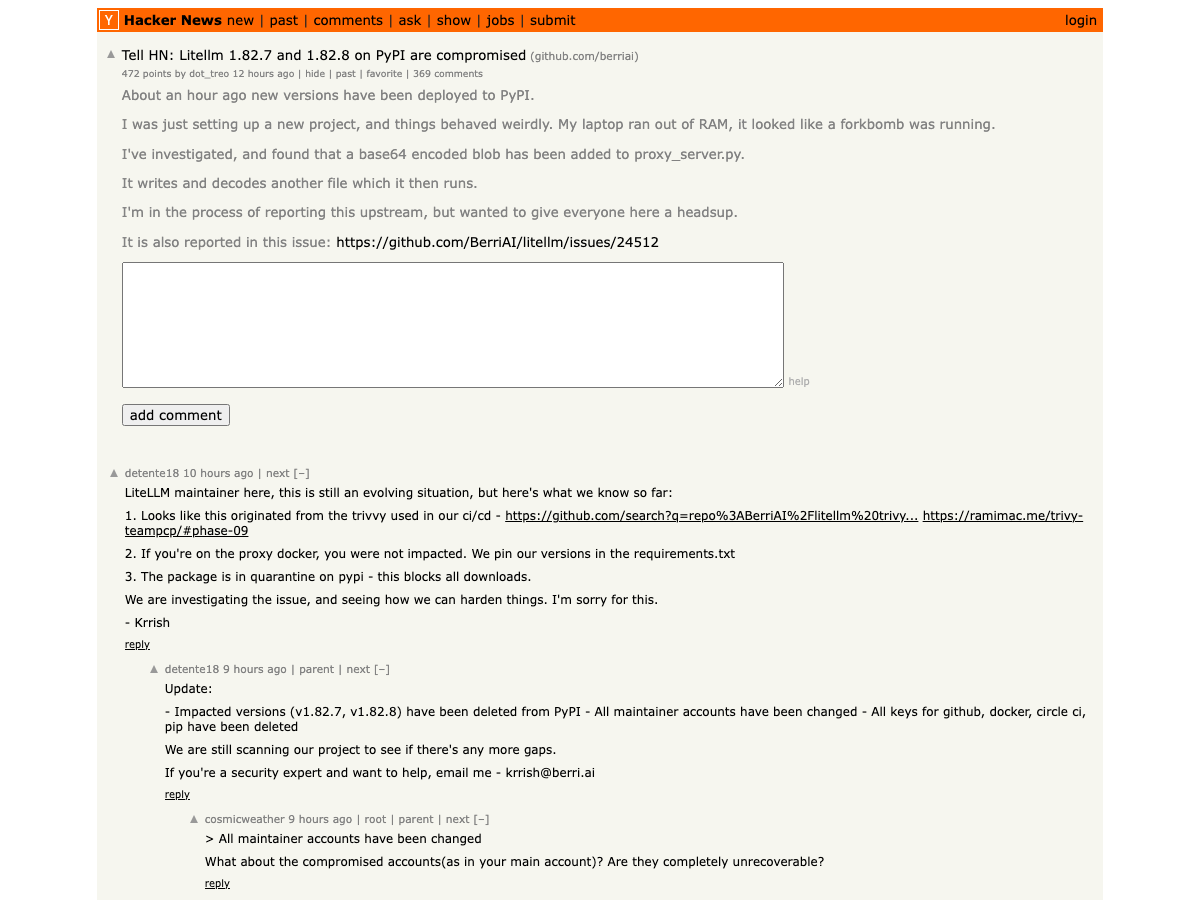
litellm==1.82.7 or 1.82.8 on ANY system — development, CI/CD, or production — assume all credentials on that machine are compromised. Rotate everything immediately. Both versions have been yanked from PyPI, but the damage to already-installed systems is done.What Actually Happened: The Kill Chain
Here's the attack chain, reconstructed from the GitHub security issue and the maintainer's response on HN:
Step 1: Trivy Compromise. The attacker compromised a version of Trivy — a popular container vulnerability scanner — that LiteLLM used in its CI/CD pipeline. This is the upstream attack: infect a security tool to access the targets that trust it.
Step 2: PYPI_PUBLISH Token Exfiltration. The poisoned Trivy variant extracted the PYPI_PUBLISH token stored as an environment variable in LiteLLM's GitHub CI pipeline. This token had enough permissions to push new package versions to PyPI.
Step 3: Malicious Package Publication. Using the stolen token, the attacker published litellm==1.82.8 (and modified 1.82.7) containing a file called litellm_init.pth.
Step 4: Automatic Execution via .pth. Here's the clever part. Python's site module automatically executes .pth files found in site-packages/ on interpreter startup. No import litellm required. If the package was installed, the payload ran every time Python started — including in CI/CD runners, Docker containers, and production servers.
Step 5: Credential Harvesting. The payload — double base64-encoded to evade naive scanning — collected:
- All environment variables (API keys, database passwords, tokens)
- SSH keys (private keys, authorized_keys, known_hosts)
- Cloud credentials (AWS, GCP, Azure, Kubernetes configs)
- Git credentials and Docker configs
- Shell history (bash, zsh, mysql, psql, redis)
- Crypto wallets (Bitcoin, Ethereum, Solana, and more)
- SSL/TLS private keys
- CI/CD secrets (Terraform, GitLab CI, Jenkins, Drone)
Step 6: Encrypted Exfiltration. The harvested data was encrypted with AES-256 (random session key), the session key was encrypted with a hardcoded RSA-4096 public key, and the package was exfiltrated to models.litellm.cloud — note: NOT the legitimate litellm.ai domain.
Who's Affected
If you're in the AI/ML space, the blast radius is significant:
- Any team using LiteLLM as an LLM proxy — LiteLLM is the go-to tool for routing requests across OpenAI, Anthropic, Cohere, and dozens of other providers. It's in thousands of production stacks.
- CI/CD pipelines that install LiteLLM — Docker builds, GitHub Actions, GitLab CI runners that
pip install litellmduring the affected window. - Development machines — Any developer who ran
pip install litellmoruv add litellmand got version 1.82.7 or 1.82.8. - Downstream dependencies — Any package that lists
litellmas a dependency and pulled the compromised version during a build.
The attack window was limited (the versions were yanked quickly), but the damage model is binary: if you installed the affected version, all secrets on that machine were exfiltrated.
Your AI Stack Audit Checklist
Here's the practical part. Whether or not you use LiteLLM, this attack exposes patterns that apply to every AI stack.
1. Check If You're Directly Affected
# Check installed version
pip show litellm 2>/dev/null | grep Version

# Check for the malicious .pth file
find $(python3 -c "import site; print(site.getsitepackages()[0])") \
  -name "litellm_init.pth" 2>/dev/null

# Check pip install history / requirements files
grep -r "litellm" requirements*.txt pyproject.toml setup.py Pipfile 2>/dev/null
If you find litellm_init.pth or had version 1.82.7 or 1.82.8 installed at any point, assume full credential compromise and proceed to step 2.
2. Rotate Everything — No Exceptions
If you were affected, rotate credentials in this order (highest risk first):
- Cloud provider credentials — AWS access keys, GCP service accounts, Azure service principals
- PyPI / npm / registry tokens — to prevent the attacker from publishing on your behalf
- SSH keys — regenerate all key pairs, update
authorized_keyson all servers - Database passwords — especially if they were in environment variables
- API keys — every LLM provider key (OpenAI, Anthropic, Cohere, etc.), Stripe, Twilio, everything
- Kubernetes secrets — rotate and re-deploy
- Git credentials — regenerate personal access tokens
3. Pin Dependencies and Verify Hashes
This is the single most impactful change most AI teams aren't doing:
# pyproject.toml — pin EXACT versions with hashes
[project]
dependencies = [
    "litellm==1.82.6",  # Known good version — NEVER use >= or ~=
    "openai==1.68.0",
    "anthropic==0.49.0",
]
Better yet, use pip-compile with hash checking:
# Generate locked requirements with hashes
pip-compile --generate-hashes requirements.in -o requirements.txt

# Install with hash verification
pip install --require-hashes -r requirements.txt
Or with uv:
# uv lock generates hashes automatically
uv lock
uv sync
uv run (which installs packages on the fly). When PyPI yanked all LiteLLM versions, their production broke. Never rely on live package resolution in production. Build artifacts. Use container images with pinned, hash-verified dependencies. PyPI going down — or being compromised — should not bring down your systems.4. Isolate CI/CD Secrets
The root cause of this attack was a PYPI_PUBLISH token stored as a broad CI/CD environment variable accessible to every step in the pipeline — including Trivy, which had no business seeing it.
Fix this:
# GitHub Actions — BAD: token available to all steps
env:
  PYPI_TOKEN: ${{ secrets.PYPI_PUBLISH }}

# GitHub Actions — GOOD: token only in publish step
jobs:
  test:
    steps:
      - run: pytest  # No access to PYPI_TOKEN

  publish:
    needs: test
    environment: pypi-publish  # Separate environment with approval gates
    steps:
      - uses: pypa/gh-action-pypi-publish@release/v1
        with:
          password: ${{ secrets.PYPI_PUBLISH }}
Even better: use PyPI Trusted Publishers which use OIDC tokens instead of long-lived API keys. No token to steal.
5. Audit Your AI-Specific Dependencies
AI stacks have uniquely deep dependency trees. A typical LLM application might pull in 200+ transitive dependencies:
# Count your transitive dependencies
pip install pipdeptree
pipdeptree -p litellm | wc -l

# Scan for known vulnerabilities
pip install pip-audit
pip-audit

# For uv users
uv pip audit
Pay special attention to:
- LLM client libraries (openai, anthropic, cohere, together) — high-value targets
- Vector databases (chromadb, pinecone-client, weaviate-client)
- ML frameworks (torch, transformers, diffusers) — enormous dependency trees
- Eval/monitoring tools (langsmith, langfuse, promptfoo)
If you're building with AI, you should know about the best AI APIs and their security postures — not all providers handle credential management equally.
6. Consider Alternative LLM Routing
LiteLLM isn't the only LLM proxy. If this attack shakes your confidence, evaluate alternatives:
| Proxy | Type | Key Advantage |
|---|---|---|
| LiteLLM | OSS (Python) | Broadest model support, but now with supply chain concerns |
| Portkey | Managed SaaS | No self-hosted dependency risk, built-in observability |
| Martian | Managed | Smart routing with model selection AI |
| OpenRouter | Managed API | Single API key, 100+ models, no SDK needed |
| Direct SDKs | N/A | Eliminate the proxy entirely — one less dependency |
For many teams, the answer might be simpler than a proxy swap: just use the provider SDKs directly. If you're only using 2-3 models, a thin abstraction layer in your own code is fewer dependencies, fewer attack surfaces, and code you control.
7. Implement Secret-Memory Isolation for Agents
This attack highlights a broader issue: AI agents that handle credentials need proper secret isolation. The NanoClaw Agent Vault — which hit HN the same day as the LiteLLM compromise — represents the emerging approach: agents can act on your behalf without raw credential access.
The principle: agents should never see plaintext secrets. Credentials live in a vault. The agent requests actions (not keys), and the vault executes authenticated API calls on the agent's behalf. If the agent's context window is compromised — or the underlying package is compromised — the secrets aren't there to steal.
This is the same principle that makes AI agents replacing SaaS both exciting and terrifying: more autonomous agents mean more credential surface area to protect.
Dustin Ingram from the Python Software Foundation walks through PyPI's supply chain security model — the exact infrastructure that was exploited in this attack. Required viewing if you publish or consume Python packages.
What the Security Community Is Saying
The security community's reaction has been swift — and the takes from AI's biggest names are alarming.
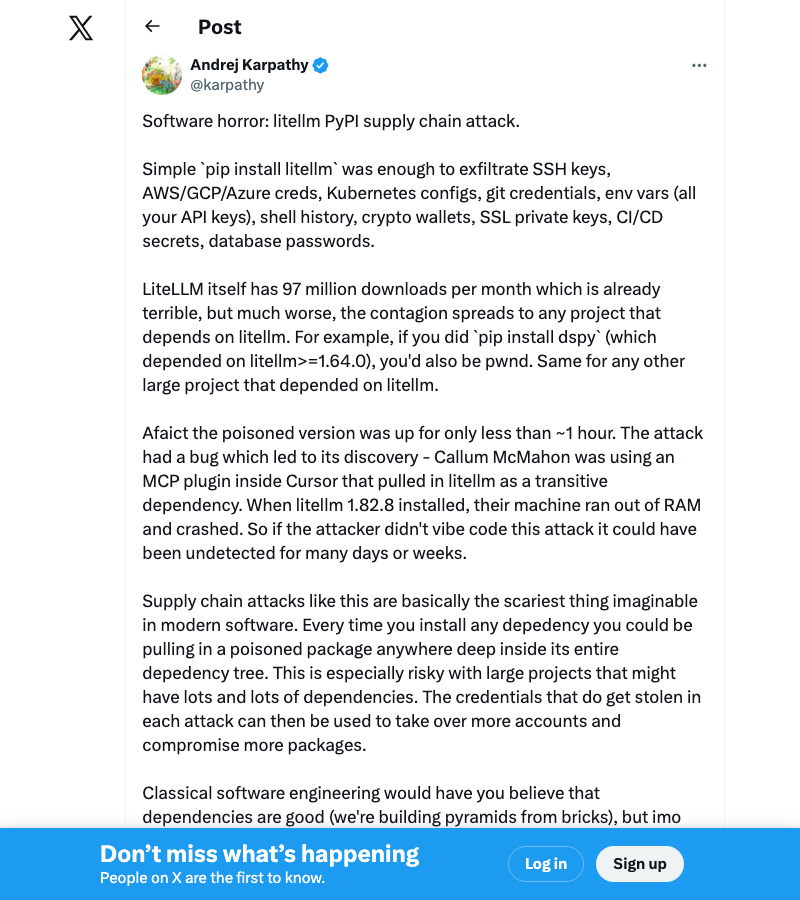
Andrej Karpathy's post calling it "software horror" pulled 6,500+ likes and 664K views — making it the single most-viewed reaction to the attack. When the former Tesla AI director and OpenAI founding member says pip install just compromised your entire credential chain, people listen.
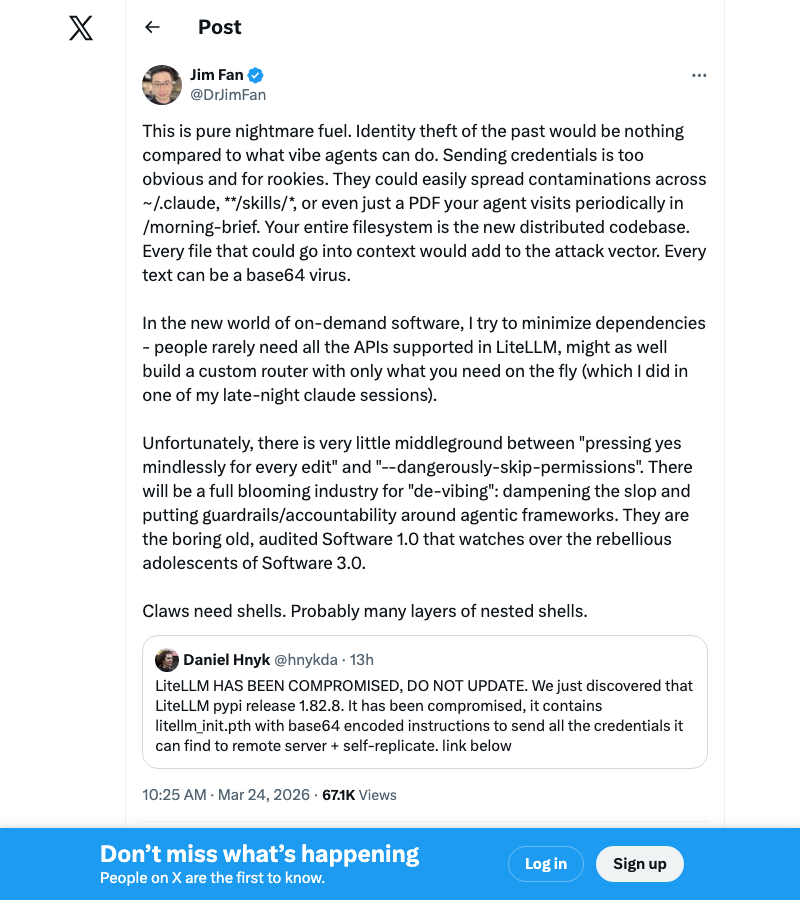
NVIDIA's Jim Fan raised the scariest implication: in a world where AI agents have file system access, a compromised package doesn't just steal keys — it can rewrite your agent's instructions, contaminate skill files, or poison documents the agent processes. This isn't theft anymore. It's agent hijacking.
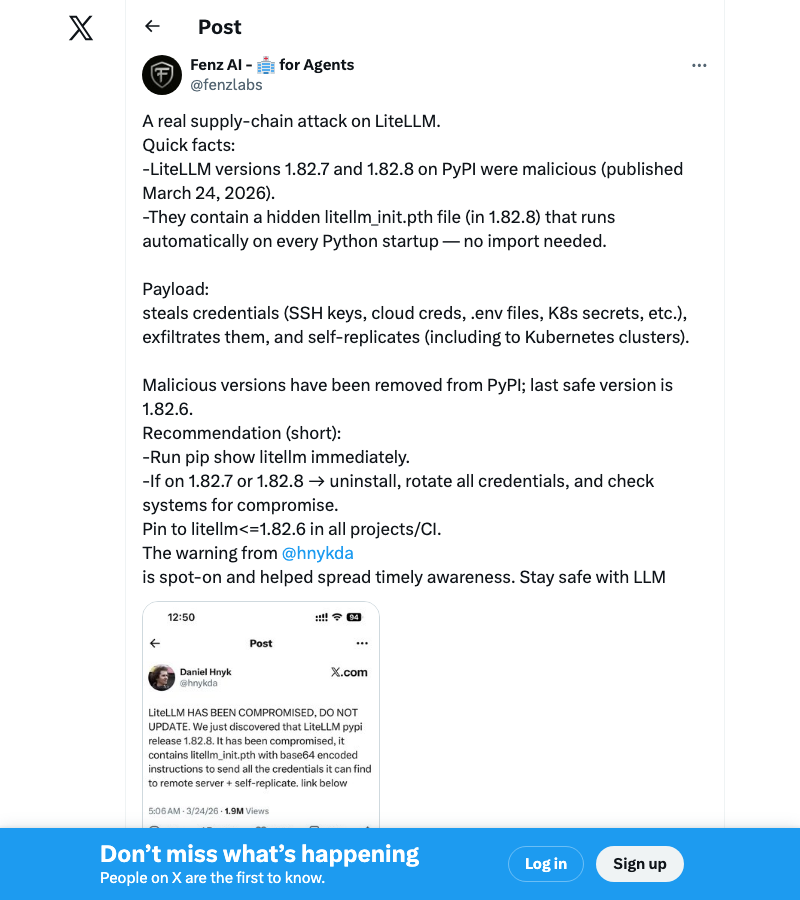
Security researcher @fenzlabs provided one of the clearest technical breakdowns: the hidden litellm_init.pth file in version 1.82.8 that auto-executes on Python startup, making the payload fire even if you never import LiteLLM directly.
The Bigger Picture: AI's Supply Chain Problem
This isn't just a LiteLLM problem. The AI ecosystem has a structural vulnerability that traditional software didn't:
AI stacks are dependency-heavy by nature. A typical web app might have 50-100 transitive dependencies. A typical AI application — with model clients, vector databases, eval frameworks, and inference engines — can have 300+. Each one is an attack surface.
AI packages handle secrets by default. Unlike a CSS library or a date formatting utility, AI packages routinely handle API keys, model endpoints, and user data. A compromised AI package isn't just running arbitrary code — it's running arbitrary code in an environment rich with high-value credentials.
The "move fast" culture compounds the risk. The AI space moves at breakneck speed. New model providers, new frameworks, new tools — weekly. Teams adopt packages quickly, often without security review. The same urgency that makes AI exciting makes it vulnerable.
Understanding how LLM proxies and gateways work is essential context for evaluating whether you need one — and how to secure it if you do.
The OpenAI acquisition of Astral (the team behind uv and Ruff) adds another dimension: when your package manager is owned by an AI company, the lines between "tool" and "attack surface" blur further. Not because OpenAI is malicious — but because concentration of control in the Python toolchain means a single compromise has wider blast radius.
What Comes Next
The LiteLLM maintainers are handling this transparently — Krrish's HN updates have been refreshingly human ("I'm sorry for this") compared to the usual corporate crisis-speak. They've deleted impacted versions, rotated all keys, and are scanning for additional compromise vectors.
But the broader lesson isn't about LiteLLM. It's about the AI industry growing up on security:
- PyPI Trusted Publishers should be mandatory for any package with >10K weekly downloads
- CI/CD secret isolation needs to be a first-class concern, not an afterthought
- Dependency hash verification should be the default, not an opt-in
- Agent credential management needs purpose-built solutions like vault-based isolation
- Build artifacts, not live installs — your production systems should never depend on PyPI being up or uncompromised
If you're building AI applications — especially with coding assistants that install packages on your behalf — this is the wake-up call. The AI stack is a high-value target. Secure it like one.
This article will be updated as the LiteLLM team publishes their full postmortem. Follow the GitHub issue tracker for real-time updates.
For more on building secure AI applications, see our guides on AI safety and ethics, the best AI APIs for developers, and running AI locally to reduce your attack surface.
ComputeLeap Team
The ComputeLeap editorial team covers AI tools, agents, and products — helping readers discover and use artificial intelligence to work smarter.
Join the discussion
Have thoughts on this article? Discuss it on your favorite platform:
Related articles
Anthropic's Best Model Can't Hold Users
Fable 5 owns 11% of enterprise spend while Anthropic dominates benchmarks. The gap between best model and best business is where the AI price war gets real.
AI Helped Design a Cancer Vaccine. What's Real?
Moderna's mRNA melanoma vaccine cleared Phase 3 trials. AI selected the neoantigens. We separate the real breakthrough from the hype.
The De-Flock Revolt: What Happens When Trust Gets Cashed Out
Flock Safety's 120K cameras face a bipartisan backlash after a cop stalked his wife 717 times and activists mapped every lens.
The ComputeLeap Weekly
Get a weekly digest of the best AI infra writing — Claude Code, agent frameworks, deployment patterns. No fluff.
WEEKLY. UNSUBSCRIBE ANYTIME.